We recently spent a day with an inventory sync that copies about 30 million rows out of a retail point-of-sale database on SQL Server and into PostgreSQL for reporting. It runs every hour. When we started, a run took about six minutes. By the end of the day it took 2 minutes 43 seconds.
The secret sauce wasn't a single trick. Every time we fixed the slowest part, a different part became the slowest, and we kept following it until we made the slowest thing in our pipeline the data access libraries we depend on. This post walks through each step, including the ones that didn't help as much as we expected.
Look, Don't Touch
The source is a vendor's database behind a live POS, which came with some rules:
- We can't change the schema. No triggers, no new columns, no CDC, no Change Tracking.
- The source has to feel nothing. Every read uses
nolock, and each store's rows are pulled into memory before anything gets written, so SQL Server never sits waiting on the Postgres side. - Incremental is off the table. There was nothing the identified a row as modified since the last sync.
The work is split by store. Four workers each pull one store's rows (about 368,000 each, roughly 55 columns wide), truncate that store's partition in Postgres, and bulk-load it with binary COPY.
So the only part we were allowed to make faster was everything after the read.
Write Ahead, Fall Behind
The sync logs a line for every store, and those lines showed the problem right away. Reading a store took 3 to 5 seconds. Writing it took 6 to 19, and the slow writes came in bursts. Bursts like that usually mean checkpoints: Postgres writes everything to the WAL first, and at the default max_wal_size we were forcing a checkpoint about once per gigabyte loaded.
The thing is, this table doesn't need any of that. The whole thing is thrown away and rebuilt from the source every hour. If the server crashes, we lose a copy we were about to replace anyway. So we made two changes:
- Unlogged partitions. No WAL at all for these tables. The cost is that a crash empties them until the next run, and they don't replicate. For a disposable copy, that's fine.
COPY ... FREEZE. We already truncate each partition inside the same transaction that loads it, which is exactly the conditionfreezeneeds. Rows get written as already frozen, so nothing has to come back and rewrite hint bits or vacuum them later.
That one step took the median run from 349 seconds to 192. The client was happy with just this, but we knew there was more performance being left on the table, and where production systems are involved, the smallest impact you can have on them, the better it is for the business.
A Disk-appointing Upgrade
The Postgres server is an Azure L-series VM, and those come with a local NVMe drive. A quick lsblk showed ours was sitting there raw: never formatted, never mounted. Meanwhile, Postgres was living on the OS disk, which is a managed disk with a throughput cap far below what the NVMe can do.
We formatted the drive, mounted it, made a tablespace on it, and moved the partitions over. Local NVMe is ephemeral: a stop/deallocate, a resize, or Azure moving the VM to another host wipes it. That would be a real problem for most data. But, again, since this table is rebuilt every hour, data loss isn't a concern and we can really make use of that extra speed.
This change bought us about 11% on the load phase. That's less than we expected, we always thought the disk would have been the slowest part of this process but it doesn't seem like it was. But this means something else was.
Profiler, Know Thyself
The sync runs on a third machine that sits between the source and Postgres. It has four cores, and htop showed all four pinned while the disks on both ends were nearly idle. The bottleneck had moved into our own custom-built sync process running on .NET.
At that point guessing stops being useful, so we attached dotnet-trace, captured 30 seconds of a live run, and added up where the CPU went.
- About 15% was a thread spinning on a lock. It was
Monitor.Enter_SlowpathinsideSslStream, on the Postgres connection. Npgsql's write buffer defaults to 8 KB, so the sync was flushing over a million times per run, and every flush fought over the TLS stream's lock. We setWrite Buffer Sizein the connection string, and the spinning dropped from about 19 seconds of CPU to about 0.2. - About a quarter of the read time was async plumbing. SqlClient's
ReadAsynccosts real CPU per row. Since we'd already decided to drain each store into memory before writing anything, there was nothing for async to wait on, so a plainRead()insideTask.Rundid the same job for less. - Then boxing everywhere.
GetValuesput every value into anobject[], which means about 1.6 billion small heap allocations per run. Npgsql then has to work out each value's type again, one value at a time, before it can write it. We switched to a typed struct read withGetInt32,GetDoubleand friends, written back out with genericWrite<T>. Nothing gets boxed on the way through, and GC dropped from about 8% of the CPU to under 4%.
That got the last run of the day down to 163 seconds. The CPU that's left is mostly TDS parsing, TLS, and Npgsql's own per-value work. So at that point, it was no longer our code that was the bottleneck, but the libraries we depend on.
The Scoreboard
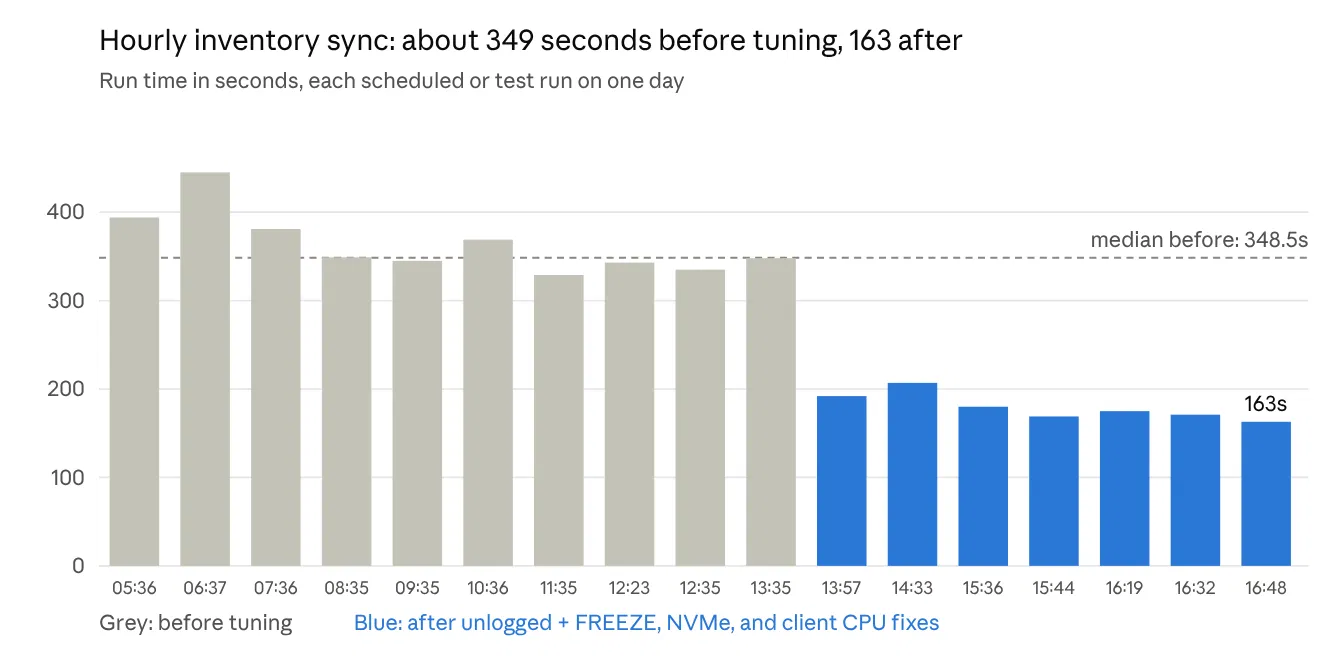
That's about 2.1× faster, with no new hardware and no changes on the source. The morning runs before tuning were also the noisiest (up to 445 seconds), which is part of why we compare medians and not single runs.
It won't scale forever. With more cores on the sync machine, throughput should keep climbing, since the per-store partitions are independent. The real ceiling is how many concurrent scans we're willing to put on a live POS. And a full snapshot always costs time in proportion to the whole table, so at ten times the data we'd need a real incremental path. That means asking the vendor for a reliable change column, which isn't always possible.
Follow the Bottleneck
There's a couple lessons here:
- the slowest part of an application is always a moving target. -> Ours went from the WAL, to the disk, to a TLS lock, to boxing, and every fix was found by measuring and making changes based on those measurements.
- Sometimes, even changes informed by measurements don't always buy the results you'd expect -> The NVMe move was a good change but a small win. We only understood why once we looked at the resources of all machines involved in process instead of just the source and the target machine.
- Constraints are design inputs -> We couldn't touch the source, so we put everything into what happened after the read. Unlogged tables on ephemeral storage would be reckless for most data. For a copy we rebuild every hour, it was exactly right.
We hope this article was worth the read and that you're able to take away something valuable from our experience.